macOS

The full workspace.

The Mac version takes everything the platform offers. Keyboard shortcuts for anything you do often, resizable panels, drag-and-drop just about everywhere, Book Card windows that float above the app, and an island design borrowed from Apple’s System Settings — rounded panels on a recessed window background.

What Mac gets uniquely
  • Table viewSortable columns, column customization, two-level hierarchy, full-width actions toolbar above the table
  • Chapter mapA proportional track where taller chapters are literally taller, with a sliding viewport indicator. If you’ve used the minimap in a code editor, you already know the idea — applied to a book instead of a source file.
  • Keyboard shortcutsFor everything: Cmd+B to bookmark, Cmd+F to search, Cmd+G for the progress drawer, F2/F3/F4 for panels, Space for quick preview
  • Resizable info panelThree-island layout that remembers its width between sessions
  • Custom library locationPoint the app at any folder on your Mac or external drive
  • Portable libraryThe whole library is one self-contained folder — copy it anywhere for a backup, or point the app at a custom location
  • Three reading modesScroll, Page, or Two pages — cycle with F1 mid-book, position is preserved

The version to use when you have a keyboard, a chair, and time.
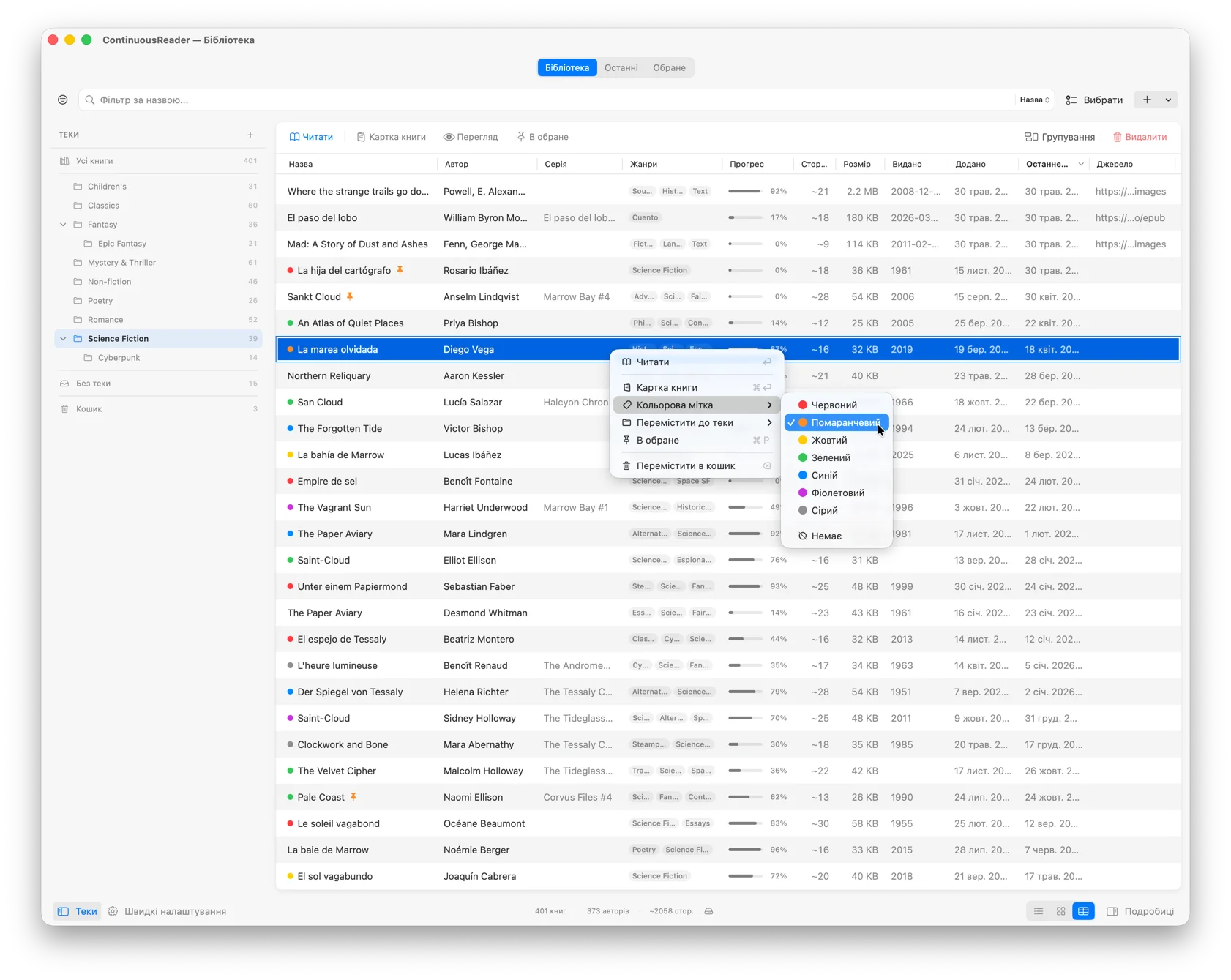
Mac library with info panel open, table view
UI: Українська
iPadOS

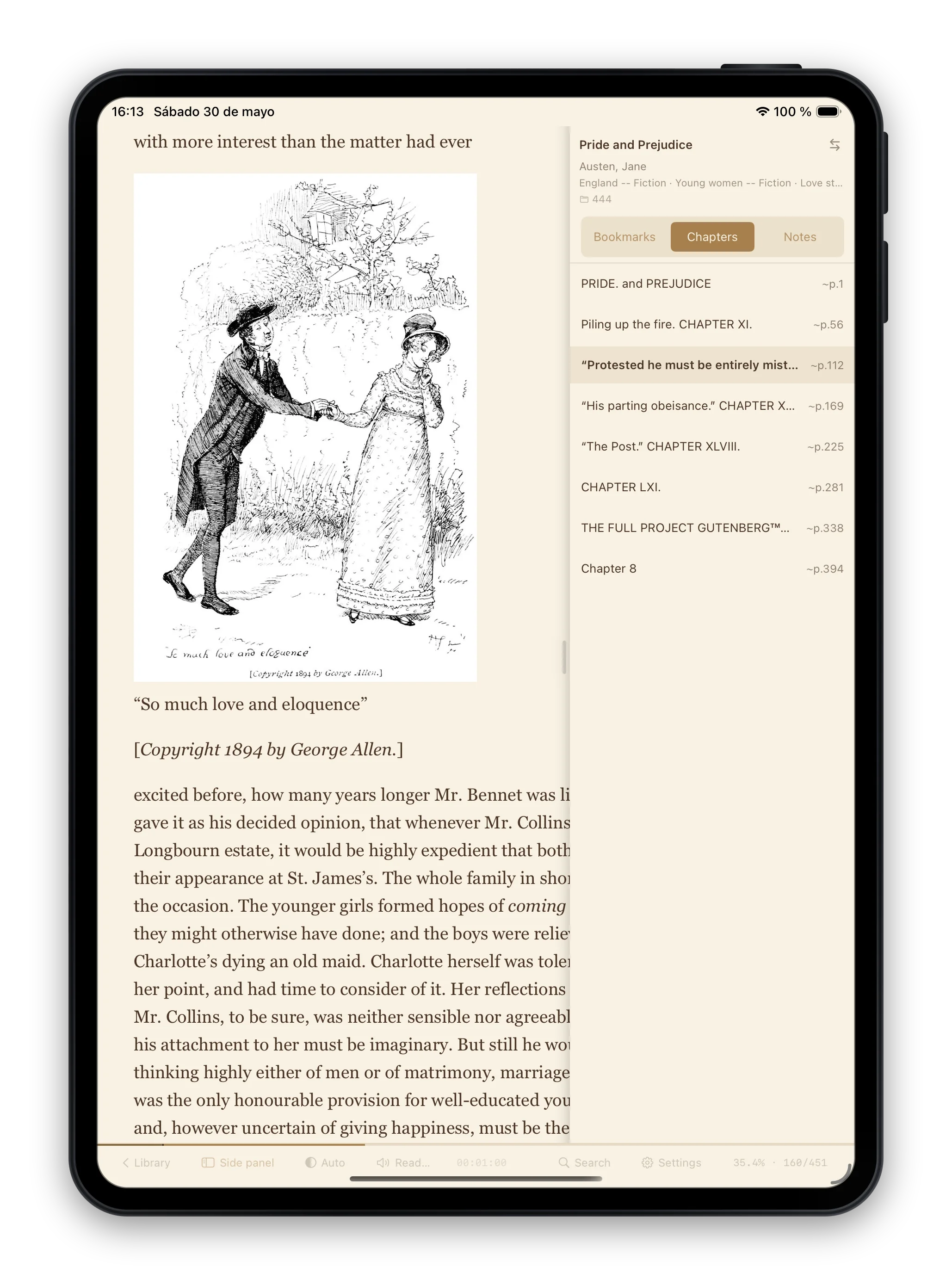
The reading surface.

iPad sits between Mac and iPhone — more room than a phone, more touch than a laptop. ContinuousReader takes advantage of both.

What iPad does uniquely well
  • Native swipe actionsOn books for quick actions (pin, color, delete)
  • Side panelWith bookmarks, chapters, and notes — same data as Mac, adapted to touch
  • Split view readyRead alongside any other iPad app
  • Two-column reading in landscapeTurn the iPad on its side and the page opens as a two-page spread — the wide screen put to work, not a stretched-out iPhone layout
  • Card view in four sizesIn quick settings — pick Big, Default, Small, or Tiny (2, 3, 4, or 5 columns). The smallest tier drops genre chips and stacks reading-time below the progress bar so the cards stay readable.
  • OPDS at full page sizeThe same catalog browser as Mac and iPhone — search, filters, shortcuts, watchers — given the whole screen instead of a window or a panel
  • Three reading modesScroll, Page, or Two pages (in landscape) — pick the one that fits the orientation
iPad library with side panel
UI: English

Same island design as Mac, same fonts, same themes. The library looks like it belongs to the same app — because it does.

iOS

The pocket reader.

The iPhone version is streamlined, not stripped. Everything that earns its place on a small screen is here; the things that don’t — the table view, the floating panels, the two-page spread — sit it out, because cramming them in would only make the app worse. In their place: quick settings, tap zones, fullscreen reading, and native sheets.

What iPhone does differently
  • One-hand friendlyControls and swipes within thumb’s reach. Two page-turn modes — top/bottom for one thumb or left/right for two — and a “Show tap zones” overlay that draws them onto the page so you never have to guess.
  • Native sheetsDifferent heights for folders, settings, filters — instead of separate windows.
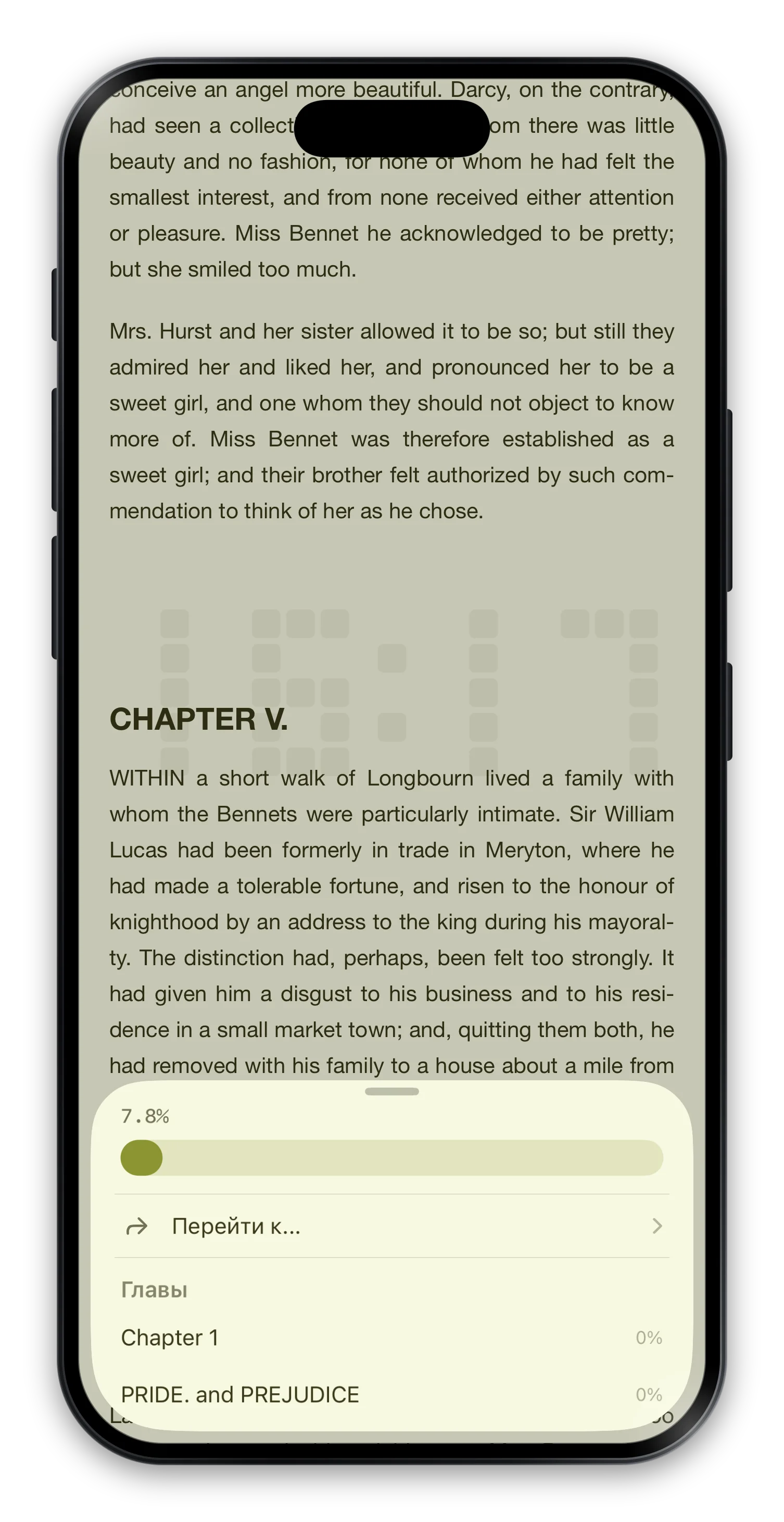
  • Center-tap fullscreenTap the middle of the screen — the reading area expands under the Dynamic Island, bottom bar hides, text fills the screen. Tap again to exit.
  • Clock and progress over the pageA small island at the bottom, a thin bottom bar, or pixel-art numerals built into the page background — clock and reading progress while you read in fullscreen. For anyone who’s ever lost track of time and missed their stop.
  • Library in list and cardsTwo of the three view modes — no table on a phone. A lot of care went into making both pleasant to thumb through: adaptive row density, and a card grid you can switch between two columns or three compact mini-cards.
  • Gesture navigationEdge swipes, swipe-to-dismiss sheets. iOS the way iOS should work.
  • Two reading modesScroll or Page — switch in Settings, position is preserved
iPhone fullscreen reading mode with pixel-art clock
UI: Русский
Common ground

Same reader, every screen.

Reading engine, position sync, 41 themes, 9 fonts, translation, Read Aloud — same code, same behavior on all three platforms.

  • Reading modesContinuous scroll, paged, or two-page spread (Mac and iPad in landscape). Switching preserves your exact position.
  • UI that adapts to the screenWider columns where there’s room, compact rows where there isn’t — same reader, the right amount of it for the device.
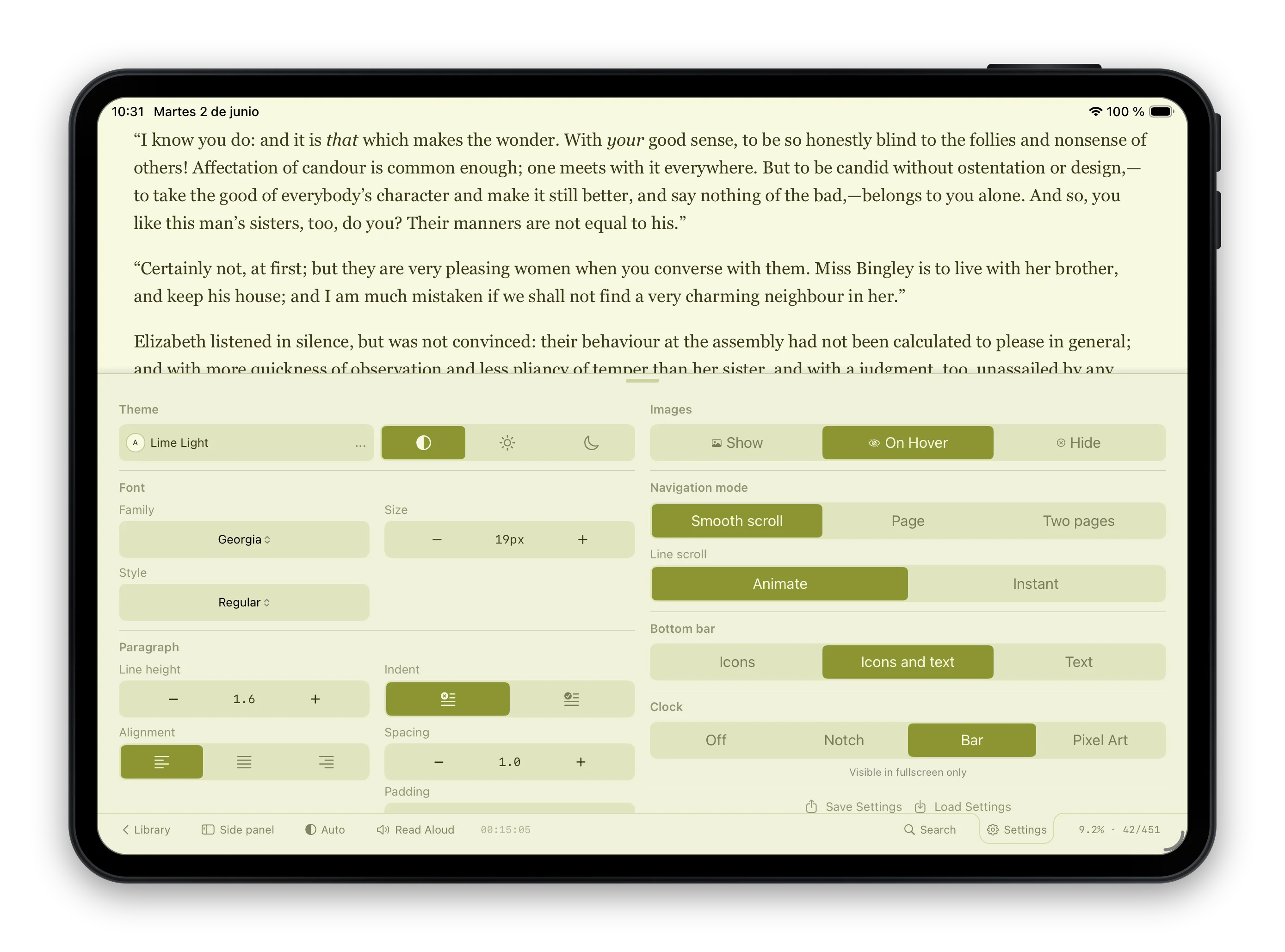
  • The same controls, everywhereFonts, size, line height, margins, paragraph spacing, indentation, hyphenation, alignment, image display, and fullscreen — every typography and layout control is on Mac, iPad, and iPhone.
iPad in landscape with the reading settings panel — fonts, size, line height, margins, paragraph spacing, hyphenation, alignment, image display, navigation mode, and fullscreen clock styles
Side by side

Feature availability by platform.

Same reader, three platforms — how each feature is adapted to each.

MaciPadiPhone
Library layoutIsland design, resizable, hover effectsIsland design, swipe actionsCompact list, swipe actions
View modesTable, CardList, CardList, Card
FoldersNested sidebar tree (F4)Nested sidebar treeBottom panel
Info panelResizable side panelResizable side panelPush detail view
Reader side panelIntegrated left panelIntegrated left panelOverlay drawer
ThemesAll 41All 41All 41
FontsAll 9All 9All 9
Typography controlsFullFullFull
SettingsPopover + Cmd+, dialogPopover, two-columnMulti-level bottom panel
Page modesScroll, Page, Two pagesScroll, Page, Two pages (landscape)Scroll, Page
Chapter map
Fullscreen readingNative macOS fullscreenCenter tapCenter tap
Fullscreen clock & progress
NavigationKeyboard + trackpadTouch + swipes + keyboardEdge swipes + tap zones
OPDSFloating windowPage-sized dialogPanel
FiltersUnified popoverUnified popoverUnified panel
Library backup (copy the folder)
Custom library location
Drag URL from browser
Mass import
Keyboard shortcutsFull setMostSome
One purchase

Buy once. Use everywhere.

Everything above is included in ContinuousReader for $19.99. Universal Purchase — buy once on any platform, install on all three, sync turned on.

Or try JustReader for free — a single-book version of the reader with the same engine, the same themes, the same translation. Available on all three platforms too.

Start reading.

Two apps. Read a book, or grow a library.